


Everything You Need To Manage Your Amazon Business In One Place.
Running an Amazon business means dealing with a lot of data — sales, ads, inventory, fees, profitability and more. Xquantum brings all of it together in one place, so you spend less time downloading reports and working through spreadsheets, and more time actually understanding your business.
 Unified Reports
All your Amazon data, in one place.
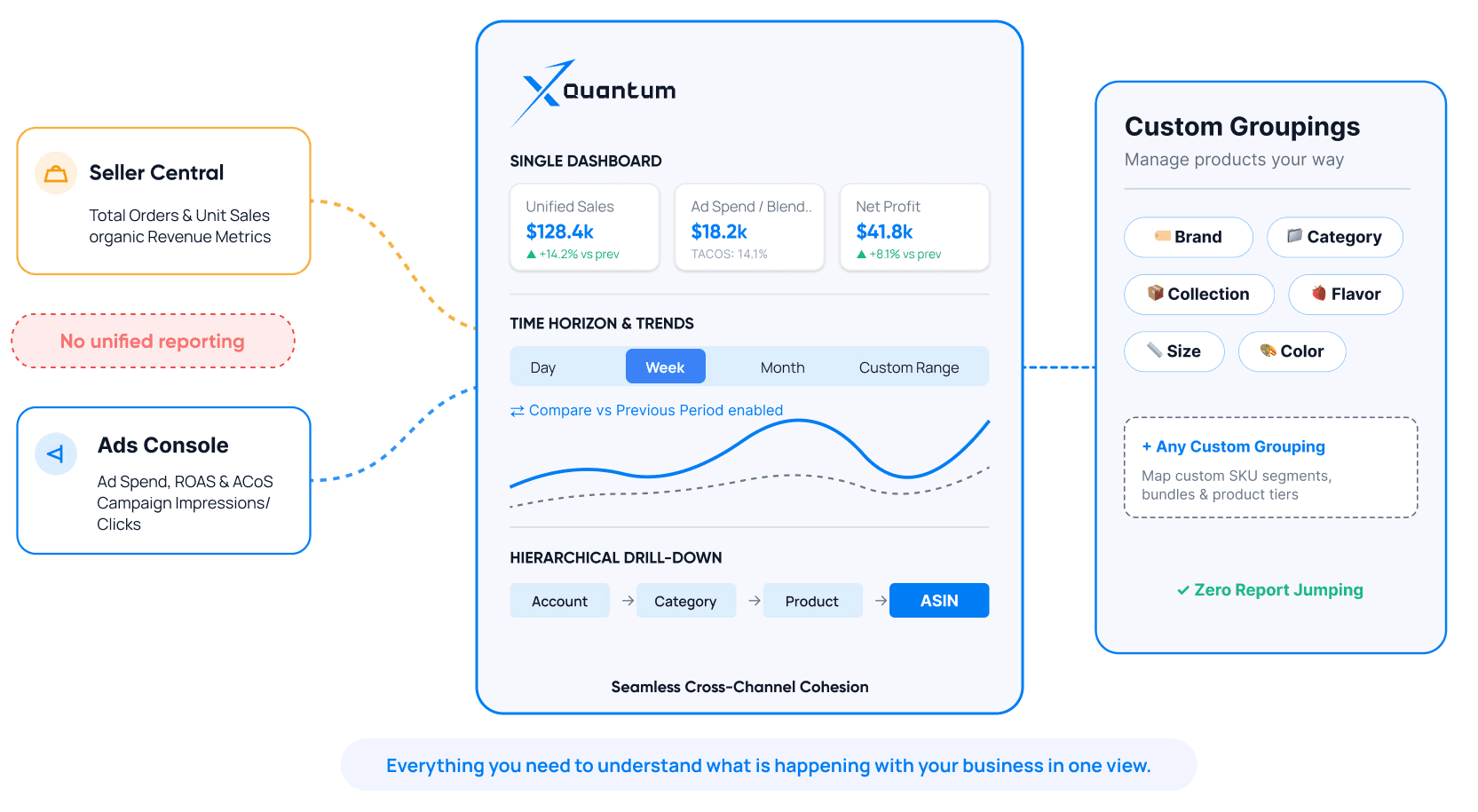
Instead of checking Seller Central for sales and Ads Console for advertising, Xquantum brings the two together.
See your sales, advertising and key business metrics in one dashboard. Look at performance by day, week, month or any custom period, compare it with the previous period, and easily move from your overall account to a category, product or individual ASIN.
You can also group your products the way you actually manage them — by brand, category, collection, size, color, flavor or any other custom grouping.
Everything you need to understand what is happening with your business, without jumping between reports.
 Advertising Data
Understand your advertising, without getting lost in the data.
Amazon Ads gives you a lot of information. Finding the information that actually matters can be the hard part.
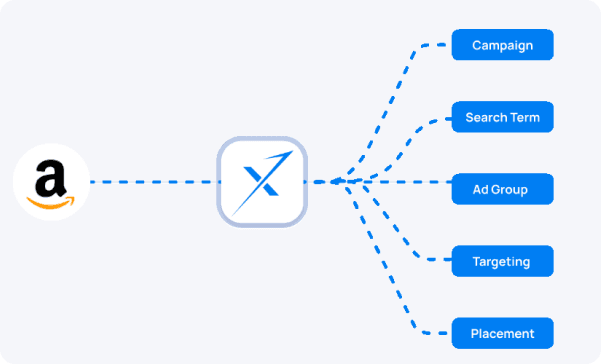
Xquantum puts your campaign, ad group, targeting, search term, placement and product data together, so you can quickly see where your money is going and what you're getting back.
Start with your overall ad performance and drill down to the campaign, keyword, search term or ASIN behind it. You can also make changes like pausing campaigns or adjusting budgets directly from the dashboard.
See what is working, what isn't, and where your ad spend needs attention.
Know what you have and when you'll need more.
Keeping the right amount of inventory is a constant balancing act. Too little and you risk going out of stock. Too much and your money sits in Amazon's warehouse.
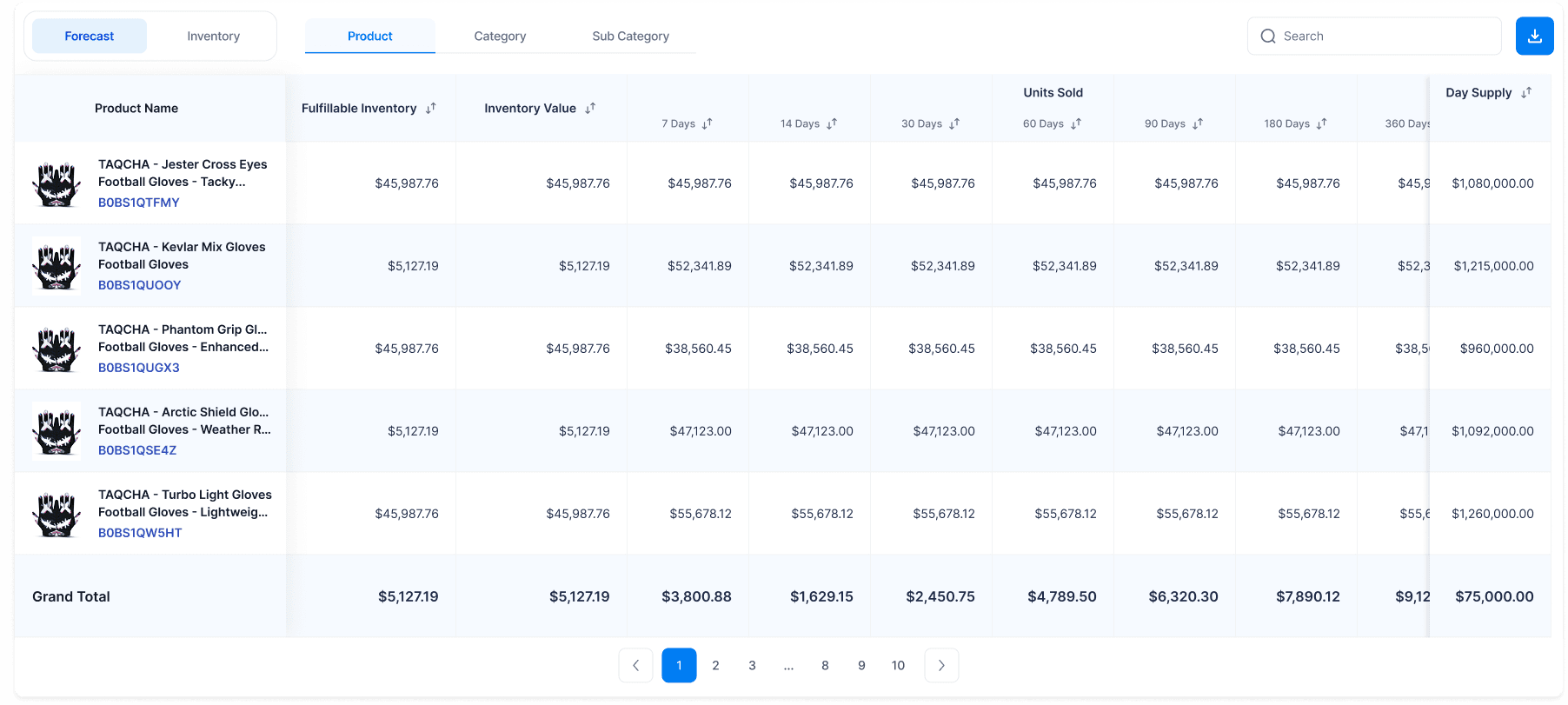
Xquantum gives you a clear view of your FBA inventory and sales history together. See fulfillable, reserved and unfulfillable inventory, look at units sold over different time periods, and understand how quickly each ASIN is moving.
With your sales history and current inventory in one place, it's much easier to plan your next replenishment.
Know what's selling, know what's in stock, and plan ahead.
 Profit & Loss
See what you're actually making.
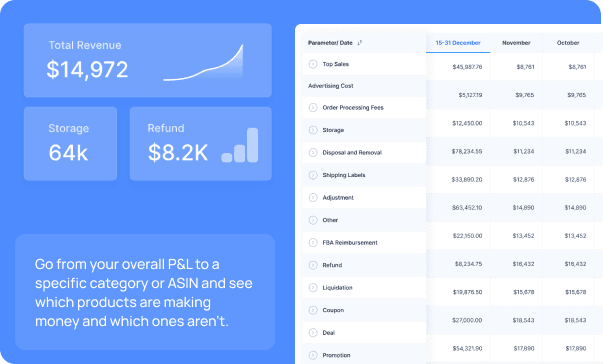
Once Amazon fees, advertising spend, refunds and other deductions are taken into account, your actual profit can look very different.
Xquantum brings these numbers together so you can see your revenue, costs, deductions and profit in one place.
Because selling more doesn't always mean making more.
 Bulk Campaign Creation
Create campaigns in bulk, instead of one at a time
Creating hundreds of Amazon campaigns manually can take hours. Xquantum lets you create Auto, Keyword and Product Targeting campaigns across multiple ASINs at once.
Build campaigns and ad groups in bulk, find keyword opportunities using search data, and keep track of which campaigns were successfully created.
Less repetitive work. More time to focus on your advertising strategy
: Complements : 0.51
Bulk Auto Campaign Creation
Automatically pause or activate campaigns, ad groups, keywords, or ASINs based on performance metrics, targets, or custom conditions to maintain efficiency and reduce wasted spend.

Status Rule
Automatically pause or activate campaigns, ad groups, keywords, or ASINs based on performance metrics, targets, or custom conditions to maintain efficiency and reduce wasted spend.
Let Xquantum handle the repetitive stuff.
Some parts of Amazon advertising need your attention. Others don't. With Xquantum, you can create rules around the things you find yourself checking and changing again and again.
Automatically adjust bids and budgets, pause campaigns, change placement modifiers, manage campaigns based on inventory, add negative keywords and move high-performing search terms into your targeting.
You decide the rules and the conditions. Xquantum takes care of the actions.
Set it up once and let it run in the background.
Look at your business the way you actually manage it.
Your Amazon catalogue isn't just a list of ASINs. Group products by category, size, color, flavor, collection, product type or anything else that makes sense for your business.
Once you've created your groups, you can use them across your Xquantum reports to see sales, ads, inventory and profitability at that level.
Your products, organized your way.
Give people access to what they actually need.
If you're working with a team, not everyone needs access to everything.
Modular Access lets account owners control View and Edit permissions for individual modules such as Sales, Ads, P&L and Inventory.
Give someone access to reports without giving them the ability to make changes, or give your advertising team access to Ads without opening up the rest of the account.
Simple permissions that give you more control over your data.
 Business Alerts
Know when something changes.
You can't sit and watch your dashboard all day.
Set alerts for the metrics you care about and Xquantum will let you know when there is a significant change. For example, if spend, revenue, CPC, CTR or ROAS moves by 20% or more, you'll get an alert.
Instead of finding the problem days later, you can look into it when it happens.
Keep an eye on your business without constantly checking it.
 Download Reports
Sometimes you just need the data.
Whether you're building a monthly report, sharing numbers with your team, or doing your own analysis, you can download your Xquantum data whenever you need it.
Export reports for Sales, Organic Sales, Advertising, P&L, Orders, Inventory and more in easy-to-use formats.
Get the data out of Xquantum and use it wherever you need it.